Monday, May 28, 2012

Sony SmartWatch as name tag

As I mentioned earlier, I got a Sony SmartWatch at AnDevCon. I have been trying to come up with app ideas, but most of them didn't pass the "I can just pull out my phone" test. I was chatting with some friends, and one of them unclipped the watch from its strap and clipped it on his shirt. Now that's an awesome name tag!

I decided to write an app that reads images out of a folder on the SD card and show them on the watch as a slideshow. I first wrote a widget, but that did not work well because there was a loading screen between each refresh. I looked into the SDK some more, and decided to write a control instead. I refactored my widget code to add a control, but the control simply would not show up on the watch. I was studying the sample code very carefully and just could not figure out why. So I went to bed.

The next morning I started a fresh project to write the control. That worked. I then added a widget. Now the widget would not show up. It suddenly occurred to me that perhaps the LiveWare manager stored the app properties in a database, and did not reset the state when I reinstalled the app, so it did not recognize the additional control/widget.

To test that theory, I went to "Manage Applications" and cleared the data of the LiveWere manager. Well well, now it didn't even know about the SmartWatch! I uninstalled the SmartWatch app and reinstalled it from Google Play. And then I did the Bluetooth pairing again. Finally I installed my extension, and indeed, now my control showed up. That was really difficult to debug!

At this point the control was just displaying some hard-coded images. I swapped in a MediaStore query to get images from the phone:

String[] projection = {
  MediaStore.Images.Media._ID,
  MediaStore.Images.Media.DATA,
  MediaStore.Images.Media.ORIENTATION
};
Cursor cursor = mContext.getContentResolver().query(
  MediaStore.Images.Media.EXTERNAL_CONTENT_URI,
  projection,
  MediaStore.Images.Media.DATA + " LIKE ?",
  new String[] { folder + "/%"},
  MediaStore.Images.Media.DATA);

A few notes here:

  • I use ORIENTATION to rotate the image before displaying.
  • The "where" part of the query is specified by data binding. It is a safe way to say MediaStore.Images.Media.DATA + " LIKE '" + folder + "/%'"

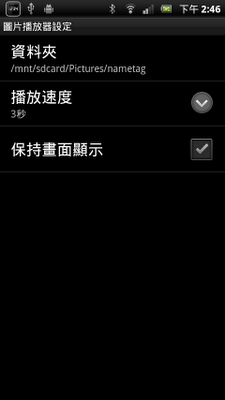
The SmartWatch dims the screen to save battery, but a dimmed name tag is a bit useless, so I added an option to leave the screen on.

setScreenState(alwaysOn ? 
  Control.Intents.SCREEN_STATE_ON : 
  Control.Intents.SCREEN_STATE_AUTO);

After adding the option to change the slide duration, I was ready to deploy. Very curiously, I got a fatal lint error, complaining that I did not localize my app to zh-rTW and ja. I could disable the lint, but as luck has it I speak both Chinese and Japanese, so I decided to localize the app!
The extension is now available on Google Play:
https://play.google.com/store/apps/details?id=com.sqisland.smartwatch.slideshow

You can also check out the Chinese and Japanese descriptions. I got lazy for Japanese, so I did not talk about selecting a folder or using it as a name tag. If you have a good translation, let me know!

The extension took me 2 days end to end. Overall it was a pretty good experience, except the part where I needed to clear data from the LiveWare manager when adding a control to an installed extension.

If you are an Android developer and you would like to get a SmartWatch for writing your own apps, you can submit a request to Sony using this link: https://www.surveymonkey.com/s/VT9D25X. If you do, ping me. I'm curious what you'll do with the SmartWatch!

Friday, May 25, 2012

Monkey Write: Now with pronunciations!

When I showed Monkey Write to new users, 8 out of 10 people would ask me, "why doesn't it pronounce the character?" My philosophy has always been "launch early, launch often", so I put Monkey Write on the market even though it was missing this obvious feature. Not any more - the latest version of Monkey Write includes pronunciations!

I recorded the characters over the weekend:

See the fancy microphone? My friend does voice-over for videos as a hobby, and I spotted the microphone when I went over to his place for board games. I borrowed it for the recording, and the sound was wonderful.

For software, I used Audacity. It was fun to see the sound wave of the characters. Look like tropical fish to me!

I sounded out all the characters in a workbook, usually twice per character, and then exported each character as a separate ogg file. Audacity made that pretty easy, which was a relief, since I always ended up yelling at iMovie whenever I needed to edit videos. A media editing UI that makes sense! Such a pleasure. If you know any one who worked on Audacity, please give them a pat on the shoulder from me.

Monkey Write pronounces the character automatically when you enter this screen. If you want to hear it again, press the sound button on the top right corner. When you are done writing the character, you will hear the character one more time.

The pronunciation-enabled version of Monkey Write is now available on Google Play Store, Amazon Appstore and the NOOK shop. Grab a copy, and let me know what you think. Will be great if you can write a review on the store too!

Thursday, May 17, 2012

AnDevCon III

When I decided to get onto the speaking circuit, my very first acceptance was my proposal to AnDevCon, way back in January. Four month later I suddenly realized that the conference was coming up in a week, and got really excited. The anticipation reminded me of the way I felt when I was going to visit an amusement park. But instead of roller coasters and free fall machines I was looking forward to tech talks and new gadgets. And AnDevCon did not disappoint.

Great talks

The speaker lineup was quite impressive:

  • My favorite talk was by Jake Wharton, the author of ActionBarSherlock. He showed us some powerful design patterns, each with a dead simple drop-in library for implementation. On top of that he was very candid, so his talk felt more like a friendly chat than a stiff lecture.
  • Saša Gargenta is so knowledgeable about the Android stack that my head was spinning just after a quick glance at his architectural diagrams. I learned a lot from his session.
  • I have watched Romain Guy and Chet Haase on video, but I had no idea that they are so funny in a live show!

My talk

I'm very honored to be speaking among such luminaries. Last month I read Confessions of a Public Speaker, and the author suggested bringing books as presents to encourage audience participations. I have not written any books, so instead I baked some Android cookies to give away.

I gave them to people who asked and answered questions, and I think that lightened the mood quite a bit. As the crowd warmed up we had a pretty good dialogue going, and I really enjoyed giving the talk.

Great discussions

Throughout the conference I got to geek out with my fellow Android developers, share our common frustrations over loading bitmaps, swap tips and tricks about xml declarations, and support each other in making outstanding applications. I am very happy that there was ample time between sessions for coffee breaks, where most of these conversations happened.

Great swags

The exhibition hall was a treasure trove. I got many t-shirts and fun little toys, but the exhibitors were also very generous in handing out devices to aid developers. I submitted a few app ideas to Sony and got a SmartWatch to develop them. The Blackberry folks was so impressed with Monkey Write that they gave me a Playbook to port it over. And on top of that, I won a Sony Xperia Arc S in the raffle!

Conclusion

Much like a visit to an amusement park, I am still abuzz with excitement from AnDevCon. I have quite a few new things to try for Monkey Write, and I may write an app or two for the SmartWatch too. I highly recommend AnDevCon to all Android developers.

More AnDevCon III coverage

Saturday, May 12, 2012

Popcorn.js with html5 slides

I heard about popcorn.js for a while, but did not have a chance to try it out. When the video of one of my talks became available, I knew I found a nail for this lovely hammer: I'll use popcorn.js to synchronize my slides to the video!

It only took a minute to embed the vimeo video. Next I wanted to change the size, so I added style="width: 160px; height: 120px" to the div container. No video. Baffled, I scoured the web for popcorn.js demos, and compared the source code with mine. By process of elimination I discovered that my html5 slides was to blame. The body tag has display: none so the unstyled articles tags do not show, but this means when popcorn.js cannot measure the size of the div container, it got zero width and height. As a work around, I added document.body.style.display = "block" after the html5 slides are initialized, but before I create the popcorn object.

Next I annotated the slides with timings from the video. I extracted the timings and use the Code plugin to update the slide. The first jump worked. But when I added a second one, the slides were no longer moving.

My code looked like this:

for (var i = 0; i < articles.length; ++i) {
  var article = articles[i];
  var timing = getTiming(article);
  pop.code({
    start: timing,
    onStart: function(options) {
      gotoSlide(i);
    }
  });
}

After a lot of experimentation, I finally got it to work:

for (var i = 0; i < articles.length; ++i) {
  var article = articles[i];
  var timing = getTiming(article);
  pop.code({
    start: timing,
    slideNumber: i,
    onStart: function(options) {
      gotoSlide(options.slideNumber);
    }
  });
}

Notice how I stash away the value of i in the hash as slideNumber and grab it from the options inside the onStart callback. What happend was that when I use the variable i directly in the callback, its value has been changed by the for-loop when the callback is executed, so it ended up calling gotoSlide(article.length), which is not valid.

My slides now have a small video playing in the top right corner, which auto-advances the slides when you start watching. Have a look and let me know what you think!

http://www.sqisland.com/talks/fluid-android-layouts

Wednesday, April 25, 2012

Monkey Write won Grand Prize in Galaxy Note App Challenge!

When Samsung announced the Galaxy Note S Pen App Challenge in February, not one, not two, but five of my friends send me the link to make sure that I enter Monkey Write into the contest. It's such a natural fit that I got to work right away.

Development

I studied the S Pen SDK to see what I can do with it. The core of the API is the CanvasView, which is a canvas that accepts and renders touch events. It comes with a SettingsView to change the pen style. Another interesting feature is the animation mode for replaying the whole stroke sequence.

To minimize code change, I layer the CanvasView on top of my stroke sketching area, and pass all the touch events down for grading purposes. The CanvasView handles all the drawing, which means that I can take advantage of the nice pen styles provided by Samsung. Once the character is finished, I animate all the strokes again, so you can review the stroke sequence and direction before moving to the next character.

These enhancements made Monkey Write quite a bit nicer, but I was hesitant to release them, for the S Pen SDK adds 1MB to my binary, which is quite a lot since the base apk is only 1.9MB. I was not sure if it was a good idea to force everyone to download an extra 1MB that only benefits the Galaxy Note users. Turns out the S Pen SDK is enabled for all Samsung devices, not just the Galaxy Note, so a lot more people ended up using Monkey Write with beautiful pen styles and engaging animation.

Announcement

A few days before the contest winners were announced, I got an email from ChallengePost, asking me to verify my name and my company. I was thinking, hey, looks like I would be on some kind of list, and nobody keeps a losers' list, right? I tried not to think too much about it, but needless to say I was rather excited.

April 23 was announcement day. I was on vacation with my family in Hong Kong, and we went for a short trip to Macau. When I woke up on April 24, I went down to the hotel lobby and checked email on one of the public machines. I was staring at my inbox for quite a long time to make sure I read it right, and yes, Monkey Write won Grand Prize!

Monkey Write has been such an amazing experience for me. Both HTC and AT&T have been really supportive, from hackathon to launch. Users have told me time and again that they really enjoyed the app, some by writing 5-star reviews, others by buying extra workbooks. On top of all that I now have the great honor of being the winner of the Samsung Galaxy Note Contest. This is simply amazing.

Thank you so much for showering Monkey Write with love!

Wednesday, April 18, 2012

Twitter Engineering Summit

When Sara Haider invited me to be the keynote speaker at the April Twitter Engineering Summit, I thought there must be a mistake somewhere. Woah, keynote? Also, why would they want a non-Twitter person speak at a Twitter event?

We met over dinner to discuss the details, and she explained that the engineering summits are hosted by Twitter, but they are public events for the local tech community, so they want a mix of Twitter and non-Twitter speakers.

I was thrilled to be invited, but I wasn't sure what I should talk about. I told her my various conferences, and she was intrigued by the mobile caching talk I was giving at Philly ETE. We decided to have caching as the overall theme, and Sara arranged two more caching talks for the evening.

Yesterday I showed up at Twitter HQ 20 minutes before the event, ready to hook up my laptop. The very organized Sara already loaded up my slides, and had the clicker set up, ready to go. My preparation then became filling my stomach with food so I would not get hungry while I speak. Easy enough.


The speakers. Photo by Sara Haider

I would be the first one speaking, followed by Lien Mamitsuka, then Sarah Brown. Lien would cover caching concerns such as security and data corruption, and Sarah would talk about web caching.


Giving my talk. Photo by Lucas Dickey

I just gave this talk in Philadelphia last week, so I was very comfortable on stage. Even though it was a rerun, the audience made everything different. The San Francisco crowd laughed at different things than the Philadelphia crowd. They noticed different things when I pulled up my "spot the difference" slide. I found myself emphasize on different things as well, based on the nods I got from the audience. It was interesting.

Q&A time came after all three of us spoke. Sarah got most of the questions, followed by Lien, and I got none. I wonder if it was because Sarah went last, or my talk was so high-level that nobody had any questions? I got a few question at Philly ETE, mostly people who were already writing mobile apps and asked about their own situations. Maybe the SF crowd was more web-centric, that's why they had more questions for Sarah?

Afterwards it was mingle time. Overall it was a really fun event. I look forward to going to another Twitter Engineering Summit, probably as audience this time :)

Monday, April 16, 2012

Monkey Write on Kindle and NOOK

Monkey Write works on both phones and tablets, but because it's targeted to children, the user experience on tablet screens is quite a bit better. Amazon Kindle Fire and Barnes and Noble NOOK are both 7-inch Android e-readers, and since reading and writing goes hand in hand, I thought their users will enjoy Monkey Write. They each have their own marketplace, so I needed to resubmit my app.

Kindle Fire

I started the application for both the Kindle and the NOOK around the same time, but the NOOK process was so tedious that the Kindle version went live a few weeks earlier. Amazon Appstore has an approval process, with an average turn around time of a day per submission.

I cut a few corners when I launched the first version of Monkey Write, and the Amazon folks caught them pretty quickly. One shortcut I took was to fix the device orientation: portrait for phones, landscape for tablets. That way I don't have to save state when Android destroys and re-create your activity upon orientation change. That caused my app to have a problem on Kindle Fire. According to the review message, "the ink disappears upon entering and exiting hibernation". I had to file a ticket to understand that hibernation is the lock screen. So it seems like the Kindle Fire, the activity is destroyed and re-created when the screen is locked. Once I found out that problem I just patched the app and resubmitted.

Besides the orientation change, I needed to make another patch. I direct the user to the appropriate marketplace to download workbooks. On the Kindle it goes the Amazon Appstore. Otherwise it goes to Google Play. But I did not consider the situation when the Amazon Appstore is installed on a phone. Amazon stipulates that all downloads go through their appstore even when Google Play is also available, but my code preferred Google Play. The fix was fairly easy, unlike the orientation change fix which took quite some time.

Overall the approval process was pretty good. My only complaint is that I only get notified when my app is approved for the general Amazon Appstore, and it needs a second approval specifically for the Kindle Fire. That's fine, but I don't get notified when the second approval comes along, meaning I have to resort to checking on the website obsessively.

Here is how to verify if your app is approved for the Kindle:

  1. Search for your app. In my case, Monkey Write
  2. Look on the left sidebar. Check the count for "Available on Kindle Fire".
  3. If the count is smaller than expected, click the checkbox to see the subset that is approved for the Kindle Fire.

Barnes and Noble NOOK

Getting into the Amazon Appstore was smooth sailing compared to the NOOK store. I already had quite an adventure when I submitted Puzzle Pal to the NOOK store. I had to go through the whole process again because I wanted to publish Monkey Write under a business account instead of a personal account.

I wanted to launch simultaneously on Google Play and NOOK, so I applied for a business account right before I was publishing to the Google Play store. Well, that got me rejected because they only accept developers who has already published apps in other app stores. Which is a bit silly, given that I have published Puzzle Pal on their own store!

I was really busy preparing the launch, so I just waited until the app was published in Google Play to retry. Second time I was rejected again, with a copy-and-pasted message:

  1. You are a commercial company submitting the request.
  2. You have a US Bank Account and Tax ID.
  3. You have developed a commercial application and/or have deployed an application already to an existing marketplace or application store.
  4. Your company, vision or applications are aligned to a reading centric audience who are using the NOOK Color in the US market.
  5. You are committed to assign the necessary resources and have firm plans to deliver your apps now for NOOK Color.

At this time your submission to us did not have evidence of one or several of the requirements listed above and therefore we regret that we are not able to progress your current request at this time.

We do however encourage you to resubmit based upon this criteria.

To be honest I had no idea what they wanted. I had my bank account number and tax ID ready to go, but there was no where to put it in the approval form. Point 3 was OK since I have already published Monkey Write to Google Play. Now, is a writing app aligned with a reading centric audience? I think so. Am I committed? Oh yeah, but how do I show that?

This is the time when I'm very glad that I already got through the process with Puzzle Pal, because I ended up filing a ticket under my personal account requesting help for my business account to be approved. You see, before you get approved as a developer you don't have access to their ticket system, so you don't really have a recourse. The rep on the other side was really helpful, and approved my business account right away. Phew!

Freemium not allowed

Once I got my account setup I uploaded the main app, plus additional apps for the workbooks. My main app went through the metadata-then-apk approval process uneventfully, but it took 10 days to go live because they only push apps once a week. The metadata for the workbooks all got rejected, though. Essentially they don't allow module downloads, breaking my freemium business model. I filed a ticket to complain. The rep was actually pretty funny. He said he knows I won't like his answer, but they don't allow freemium business model. He even told me that he knows the pain I went through to get a developer account, and he assured me that if I rebundle my app to trial/paid model it will work really well.

And that's what I did. I put all the workbooks into a single app, give it a price tag of $19.99, and put it on the NOOK store: http://www.barnesandnoble.com/w/books/1109941306. I am providing lifetime updates as new workbooks get published, so I thought $19.99 is a pretty good deal. Very happy to know that the NOOK users agree with me, because a few of them have bought Monkey Write already!

In the end I am glad that the NOOK store forced me to try a different business model. Their trial mode is pretty nice: users get to keep their score while they update, which is a much smoother experience than the Google Play Store, where you need a different package name. For Monkey Write, I provide a "upgrade" button on the bookshelf:

Comparison

The Amazon Appstore is much more mature than the NOOK store, and the approval process is much smoother. The flip side is that the NOOK store does not have as many apps, so there is less competition in terms of app discovery, resulting in more downloads. Both of them required patches, but in my case it was worth the extra work to reach a brand new set of tablet users.

Have you published Android apps? Where? What is your experience? I would love to hear your stories!