Showing posts with label video. Show all posts

Saturday, June 4, 2016

Coding live stream

I first heard about live streaming when I watched Dina Rodriguez hand lettering on Twitch.

But I wasn't sure what to do in front of a live audience, so I didn't do anything about it until I met Liam Spradlin at Google I/O. He started streaming after watching Dina, and encouraged me to try it, giving me lots of practical tips. There was a lot of code labs announced at Google I/O, so I thought, hey I want to do them anyway, why not live stream too?

Software

OBS, Open Broadcaster Software. Free, available in Windows, Mac and Linux.

Streaming service

restream.io: Stream to many places at the same time. I picked:

Layout

Here is how my desktop looked like during live stream:

My monitor resolution is 2560x1600, and I cropped the Display Capture to 1920x1080 so get the 16:9 aspect ratio. I popped out the chats from the 3 services so I can monitor them, but put them outside of the capture area so my audience won't see them.

I put the emulator outside as well, and declare it as a source in OBS so it is always visible, even when I type in Android Studio. If I want to hide it, I move it down in the list of sources in OBS.

The last source is my webcam. I cropped it to a square.

Here is how it looks like when I stream:

The emulator source is in the top right, and the webcam source is in the bottom right.

Preparation

  • Click "Start Recording" in OBS to see what it captures, and adjust the microphone, webcam etc as needed.
  • Set up the channels in restream.io, and copy the stream key to OBS.
  • For each channel, set up archiving on the site itself e.g. YouTube.
  • Set up OBS with the instructions from livecoding.tv: https://www.livecoding.tv/obs-guide
  • Increase the font size of your browser and IDE.
  • Try out a little bit whatever you plan to do while streaming. I was going to stream from my Linux box, but couldn't get the Android Wear N Preivew emulator going, so I had to switch to my Mac.
  • Advertise multiple times before the live stream, and once again after you have started streaming.

Streaming

Keep an eye out on the chat windows when you stream. Live stream is much less fun without audience interaction! I say my reply out loud, but type links into the chat window so people can click on them.

Results

I trimmed the video to skip the initial part when I'm setting things up and waiting for people to show up.

People seem to like it!

Next

I'll try to stream once a month. I'll be announcing them on Twitter, and you can also subscribe to our YouTube channel to get notified of the recorded videos.

Thursday, December 24, 2015

My 2015

End of year offers a great opportunity to take stock at what I have done. Here are my highlights.

Public Speaking

This year I have shifted my efforts from giving talks to enabling others to do so.

  • I started the Technically Speaking newsletter (please subscribe!) last year with Cate Huston, and we continue to publish one issue per week.
  • I ran a grassroot campaign to get more women to speak at Droidcon NYC, resulting in 22% female speakers. I hope this will serve as a blueprint for others, especially conference organizers, to push the limits.
  • In September I gave my very first keynote speech, sharing my tips to blog and speak more. Please watch it and let me know if it helps you get started and level up on your blogging and speaking!

Android Dialogs

I started a YouTube channel with Huyen Tue Dao to interview people in the Android community. It has been really fun picking up video production, and we have been adding more visuals to aid explanations.

Sketchnotes

This came as a total surprise, as I have always considered myself as someone who cannot draw. Turns out sketchnoting is more about constraint satisfaction than drawing. And as an engineer, I am extremely good at that.

I really enjoyed sharing my learnings from conferences this way. I have scanned all my sketchnotes from 2015 into a PDF collection:


gum.co/Sketchnotes2015

It is free to download, but you can also chip in a few dollars if you'd like to support my work.

Courses

I published two classes with Pluralsight this year:

I also drafted a outline for my Espresso book, and wrote a course from it:


gum.co/AndroidTestSharedPref

2016

A few of these projects were surprises. I never thought I'd be producing one video a week, or be known for taking graphic notes! I have no idea what 2016 will bring, but I am looking forward to it!

Monday, December 14, 2015

Use Quicktime to record your own talk

There are many reasons why you may want to your talk recorded:

  • You can watch it again yourself to look for things you can improve.
  • People at your talk can watch it to refresh their memories and share it with their friends.
  • People not at the event get to watch you talk.
  • Conference organizers get an idea what they are getting when they accept your talk proposals.

However, not all meetups and conferences record their talks. If they don't, you can do it yourself with a screen record. Quicktime is the easiest way to do it on a mac.

Screen record with Quicktime

  1. Select File → New Screen Recording.

  2. Click on the down arrow next to the red button to make sure you are recording the sound.

  3. Press the red button to start recording.

Second camera

If you want to be fancy, you can set up a second camera to record your face. I use a camcorder, but you can also have a friend record you with another laptop.

On the second laptop, choose File → New Movie Recording.

You can either turn the laptop around to use the built-in camera, or attach a USB webcam. Make sure you record the sound as well so you can use it to sync up with the screen capture from your laptop.

You will need to put the two clips together. I use Camtasia as my video editor, but iMovie probably works too.

Here is an example of a talk that I recorded myself:

Tips

  • Try it before the actual event to make sure you know how this works.
  • Clear up enough disk space for the video. You will need gigabytes!
  • Put a post-it on your laptop so you don't forget to start recording at the beginning of your talk.
  • From @JakeWharton: Record the screen on which the presentation is being displayed. Don't record presenter display!
  • From +SebastianoPoggi: You can also use VLC for added quality and stability (QT crashes write often). Plus not Mac only :)

Saturday, August 8, 2015

AT&T IoT Hackathon Boulder

Last week I went to the AT&T Internet of Things Hackathon in Boulder with Brenda, Sepideh and Joan from Android Atelier. After a very intense 24 hours, we won!

A part of Android Atelier is to encourage everyone to document what we do. For this event, we recorded it three ways: blog, sketchnote and video!

Blog

Sepideh wrote a very detailed account right after she got back, and then a follow-up on how to control the Harman speakers once our prizes arrived!

Sketchnote

I wanted to visualize the ups-and-downs we went through at the hackathon, so I made an annotated graph.

Video

Brenda made a video with our demo, the winning announcement, bloopers and various tidbits from the hackathon.

Source code

github.com/AndroidAtelier/nfc-hunt

The sound only works with Harman speakers, but the NFC part should work as is. I got some NFC tags as swag from conferences. If you don't have them, try hotel key cards or luggage tags. Let me know if they work.

Tuesday, August 4, 2015

Testing SharedPreferences with Dagger and Espresso

Back in April I asked if people are interested in an Espresso book. The responses are very encouraging, but I am still intimidated by the idea of writing a whole book. Rather than wait until I muster enough courage (and time) to take on a book project, I decided to start with bite-sized courses.

The first course

Testing with SharedPreferences with Dagger and Espresso covers dependency injection with Dagger for testing, and walk through a sample app to use it to test SharedPreferences. The course includes 8 videos, plus the source code.

I hope you find it useful!

Thursday, July 16, 2015

Android Atelier: Lunch In code review

I started an intermediate Android study group with Women Who Code Boulder/Denver called Android Atelier. Our goals are:

  • Explore new techniques
  • Learn from each other
  • Contribute to open source

Hackathon

Our first meetup was on June 9. We brainstormed for our first project, and decided to enter a hackathon together. It was a great way to bootstrap our efforts, using the hackathon to impose a real deadline.

We worked from home after the meetup, keeping in touch on Google Hangout. The time pressure made it a bit stressful, but it was so rewarding to see the group working together and finishing the app in 3 weeks!

Here is our entry, Lunch In:

challengepost.com/software/android-atelier-lunch-in

Code review

We met again on July 14 to review what we did for the app. It was a great discussion of the techniques we used:

  • Fragments
  • BroadcastReceiver to detect wifi state change
  • AlarmManager
  • Notifications
  • Custom view
  • Animations
  • Database (using the Cupboard library)
  • SharedPreferences
  • Testing

I made a screen recording of the code review. Check it out:

Source code: github.com/AndroidAtelier/lunch-in (Tag: v0.1.0)

Sunday, June 28, 2015

Android Camera2 API talk

Since I started helping with GDG Boulder, I have been only organizing beginner events, especially for Android, because I sensed that the audience does not have a lot of Android experience.

At our Android Hack Night in April, someone came up to me and said, "Can we have more advanced events? I haven't been coming because I am looking for more advanced material". I did a mental face palm when I heard that. Of course! I have been organizing beginner events. Beginners come. That doesn't mean we don't have members who want advanced events. I have been hungry for advanced Android talks myself, and should have just gone for it instead of tiptoeing around imaginary audience preferences.

Camera2 API

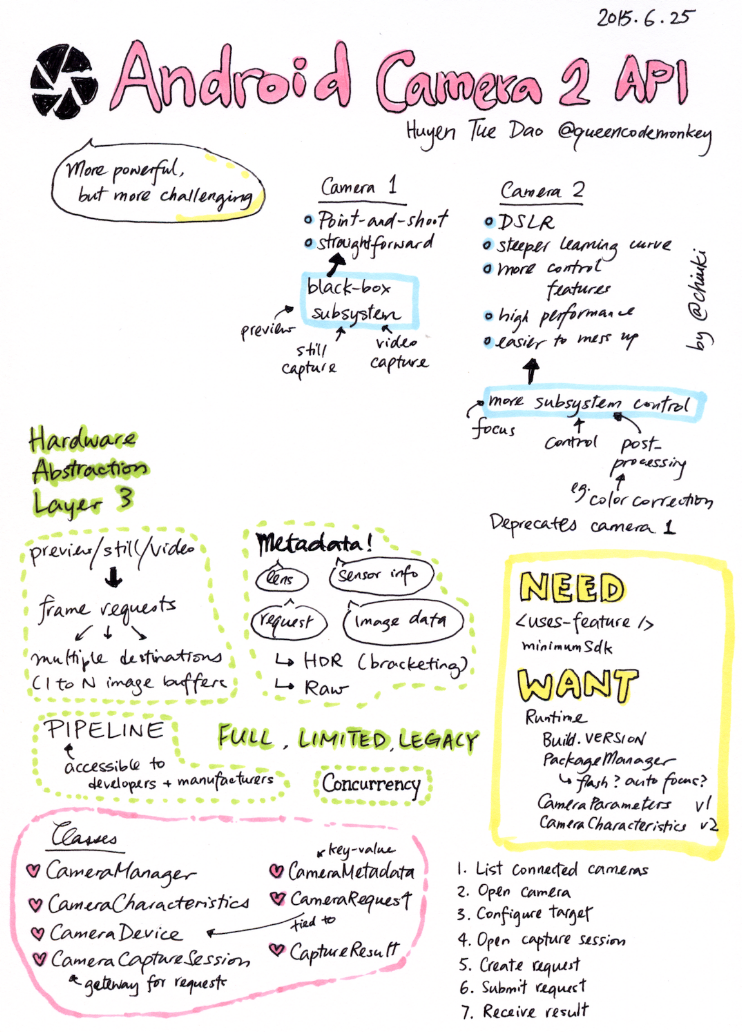
After hearing that I happily scheduled an advanced Android talk for June. Huyen gave an informative and entertaining talk on Camera2 API, and I really enjoyed it.

Raffle for ideas

I always ask people to tell me what topics interest them, but they never actually do. This time, my friend Dave Smith said he wants to give a way a couple of Android books, so we ran a raffle. To enter, people need to put in their name and also a suggestion for future event. I collected quite a few ideas this way. Win!

Friday, June 19, 2015

Android Dialogs: Launch!

My favorite part about going to conferences is to chat with people. I learn so much by talking shop. I was chatting with my friend Huyen about that, one thing led to another, and we ended up collaborating on a YouTube channel!

I present to you Android Dialogs, where we have bite-sized conversations with people from the Android community. In our first episode, Huyen and I interviewed each other.

We talked with quite a few people at Google I/O, so stayed tuned for more! Best way to stay tuned? Subscribe:

https://www.youtube.com/channel/UCMEmNnHT69aZuaOrE-dF6ug

Yes, the URL is awful. We need 500 subscribers to get a custom one. So, subscribe, pretty please?

Monday, June 15, 2015

A day in Colorado Springs

I have been reading a lot more graphic novels since I started sketchnoting. Right now I am reading An Age of License by Lucy Knisley, a travelogue with delightful illustrations. I am not even half done, and I already wanted to make a travelogue. So I did, with my trip to Colorado Springs last weekend!


Sunday, May 10, 2015

Sketchnoting: Fast-motion video

As I was sketchnoting Tweeting about Speaking, a thought occured to me: it'll be so cool if I can make a video like the doodling tutorial from PicCandle! At that point I have already drawn the title, but I put down my pen to figure out how to record it.

Overhead camera

I set up the webcam mount that I use to record app demos. It almost worked: I could not capture the whole page because the rod was too short. So I propped it up with a box and put some weight on the clipboard to balance the mount.

I was worried that the mount would bother me when I was drawing, or my head would get in the way in the video. Turns out the problem was that the mount would bounce when I leaned my weight on the table, making the video shaky. Fortunately the bouncing got smoothed out when I increased the speed of the video. In fact the jerky jumps made it look retro and cool.

Audio

I wanted some cute background music, so I searched for podcast-safe music, and found this awesome track called Ice Cream Sandwich. I love the tune, and I love the name! But it was marked for non-commercial use, and I'm not sure if I can use it in a YouTube video. So I picked Dancing on Green Grass by The Green Orbs from the YouTube Audio Library instead.

Result

The fast-motion makes it look like words and pictures just magically appear on the page :)

Monday, January 27, 2014

Authoring for Pluralsight

When I decided to become a public speaker, I had no idea where it would lead me. I have met many wonderful people at various conferences, and it opens so many doors. So when my friend Corey Latislaw asked me if I'd like to be introduced to Pluralsight to record some video classes, I went, "Sure!"

Audition

The first step to becoming a Pluralsight author is to submit an audition video. You pick a topic, create the slides and demo, and explain everything in 10 minutes. It was a bit challenging to find a bite-sized topic like that, but I lifted a part from my Bust the Android Fragmentation Myth talk and created a video for it:

Once the audition video is accepted, we need to come up with an outline for my first course. I went through my existing talks to see what makes sense for the Pluralsight audience, and decided to author a course on Android Layout Fundamentals based on my Android Layout 101 talk.

Equipment

For software, I have already downloaded Camtasia for the audition video. Now I need hardware as well. Namely, a microphone. I bought the Rode Podcaster as recommended by Pluralsight. It was quite pricey, but I figured I'd use it to record pronunciations for Monkey Write as well, so it should be a good investment.

Recording

Here comes the meat of the process: recording the videos. Initially I thought it will be like giving live talks, but it turned out to be quite different. First of all, if I stutter or make a mistake at a live talk, I simply move on. There is no "undo" when you are on stage. But when I record, I feel obligated to edit out the bloopers, so that introduced quite a lot of extra work.

The format of my slides are also a bit different. I like using "highlight slides" to focus attention on the point I am giving. So I will have a slide like this:

public void someFunction() {
  doSomething();
  doSomethingImportant();
  doSomeOtherThing();
}

And the next slide will highlight the part I am addressing:

public void someFunction() {
  doSomething();
  doSomethingImportant();
  doSomeOtherThing();
}

With Camtasia I can add highlighting to the video afterwards, and I found that better than slides highlighting because I can sync it up to the audio. I highlight the words exactly when I am describing them with my voice. The syncing makes the focusing even stronger, and it gives a good cadence to the video.

Review

A pluralsight course consists of multiple modules, each of which needs video clips, slides, demo code and assessment questions. I was focusing on the video part and recorded three modules before I realized I should have completed a single module and submit that for review. So I prepared the rest of the module and sent it off to the editorial team. Overall feedback was good, but I had a few issues:

  • My 'p's are popping. I need to adjust the microphone distance.
  • The volume needs to be more consistent
  • I need to introduce each of my modules

I wish I got the feedback before I recorded so many clips already! I should have submitted my very first clip and waited for feedback before proceeding. Now I know!

Demo

I never live code during my talks because so many things can do wrong. But with video I have more control, and I demoed some Android tools in the last module of Android Layout Fundamentals. I did not realize how hard it is to talk and type at the same time! I considered recording the demo first, adding the voice-over later, but figured I'd forgotten what I was trying to explain by the time I go back to do the voice-over. So instead I type-and-talk while I could, and stopped typing to focus on talking while I couldn't.

Tips and Tricks

I learned a few techniques after producing the first course:

  • To ensure consistent volume, do not stop recording if you make a mistake. Just stop to recompose yourself, and say it again. Later you can edit out the mistakes and silences. I found it hard to speak at the exact same loudness if I stopped talking for too long.
  • I don't like to script my talks, but I noticed that I re-record a lot when I tried to define a concept. So now I write down the definitions and edit them to my liking before I record. By reading out the written definitions I can often do it in one take, which is a major time saver.
  • I love my Kinesis keyboard, but it makes a lot of noise when I type, and it's a bit distracting in the video. So I type on the keyboard of my laptop instead.
  • When doing demos, don't worry too much about talking and typing at the same time. I type, and then explain. Later I split the video and audio tracks in Camtasia and splice them back together so I am talking over the demo.
  • When you are talking during the demos, do not jitter the mouse! It makes the video splicing much harder.

It's live!

I started recording in September, and thought I'd be done by November. But of course things always take longer than expected. I finished everything by mid-December though, so the delay wasn't too bad. And it was so exciting to see my course go live!

I have not received my first royalty check yet, so I cannot tell you if this is worth doing financially. But the Pluralsight people have been super friendly and helpful, and I really enjoyed working with them. In fact I am already thinking about my next courses!

If you are sitting on the fence about becoming a Pluralsight author, go for it! It's very satisfying to see your knowledge solidified in the form of a video course. Ping me if you have questions, or would like to be introduced to the editorial team!

(Full disclosure: I earn a referral bonus when I introduce people to Pluralsight who go on to publish a course)

Sunday, July 1, 2012

Public speaking mid-year score card

Can you believe it's July already? I started the year with a resolution to be a public speaker, with the specific goal of giving 5 lightning talks and 3 full-length lectures. Let's see the mid-year score card!

Lightning talks

  1. April 2, 2012: Ignite Where 2012, San Francisco, CA
  2. June 28, 2012: Ignite Google I/O, San Francisco, CA

Full-length lectures

  1. April 6, 2012: Fluid Android Layouts, WindyCityGo, Chicago, IL
  2. April 11, 2012: Caching Strategies for Mobile Apps, Philly ETE, Philadelphia, PA
  3. April 17, 2012: Mobile Caching Strategies, Twitter Engineering Submit, San Francisco, CA
  4. May 16, 2012: Reusable Custom Components, AnDevCon III, Burlingame, CA
  5. June 8, 2012: Progressive enhancement for Android web apps, Dutch Mobile Conference, Amsterdam, the Netherlands

Looks like I'm coming short on the lightning talk side, which is quite surprising. I thought it would be more difficult to get accepted to give lectures. Also interesting that all my lightning talks were in Ignite talks, which is way more challenging than the speak-at-a-meetup quick talks I had in mind when I came up with the goals.

Ignite at Google I/O

Ignite talks are challenging because it follows a very specific format: 5 minutes, 20 slides, auto advancing. The auto-advancing slides is the trickiest bit, since you don't control the rhythm any more. I rehearse way more for Ignite than my full-length lectures, because I need to internalize the timing to sync my speech to my slides. It's almost like lip-syncing!

The first time I gave an Ignite talk was at Where 2012, to a crowd of 30 people or so. I was rather scared of the auto-advancing slides, but I found that I just need to wait until the next slide to appear before transitioning to a new topic.

Ironically, because I felt I did pretty well at my first Ignite, I was more nervous when preparing for my second one. I kept thinking that it was not quite as good. I mentioned that to my friend Julia, and did a practice run with her. She loved it! I notice that I really feed off the energy from the audience, even if only one person was listening. So the practice run was all I need to get back my confidence.

Ah, confidence is such a fragile thing. I walked into the room, and wow, it's big! It probably seats a thousand people. A thousand people! Plus the event was live streamed. I never spoke to such a large crowd, and I was so ridiculously nervous while waiting for the show to start. Fortunately once I got on stage I was back to my elements.

Here is the recording of the Ignite show at Google I/O. Let me know what you think!

Saturday, May 12, 2012

Popcorn.js with html5 slides

I heard about popcorn.js for a while, but did not have a chance to try it out. When the video of one of my talks became available, I knew I found a nail for this lovely hammer: I'll use popcorn.js to synchronize my slides to the video!

It only took a minute to embed the vimeo video. Next I wanted to change the size, so I added style="width: 160px; height: 120px" to the div container. No video. Baffled, I scoured the web for popcorn.js demos, and compared the source code with mine. By process of elimination I discovered that my html5 slides was to blame. The body tag has display: none so the unstyled articles tags do not show, but this means when popcorn.js cannot measure the size of the div container, it got zero width and height. As a work around, I added document.body.style.display = "block" after the html5 slides are initialized, but before I create the popcorn object.

Next I annotated the slides with timings from the video. I extracted the timings and use the Code plugin to update the slide. The first jump worked. But when I added a second one, the slides were no longer moving.

My code looked like this:

for (var i = 0; i < articles.length; ++i) {
  var article = articles[i];
  var timing = getTiming(article);
  pop.code({
    start: timing,
    onStart: function(options) {
      gotoSlide(i);
    }
  });
}

After a lot of experimentation, I finally got it to work:

for (var i = 0; i < articles.length; ++i) {
  var article = articles[i];
  var timing = getTiming(article);
  pop.code({
    start: timing,
    slideNumber: i,
    onStart: function(options) {
      gotoSlide(options.slideNumber);
    }
  });
}

Notice how I stash away the value of i in the hash as slideNumber and grab it from the options inside the onStart callback. What happend was that when I use the variable i directly in the callback, its value has been changed by the for-loop when the callback is executed, so it ended up calling gotoSlide(article.length), which is not valid.

My slides now have a small video playing in the top right corner, which auto-advances the slides when you start watching. Have a look and let me know what you think!

http://www.sqisland.com/talks/fluid-android-layouts

Wednesday, April 4, 2012

Going on the speaking circuit

Did you know that the term "speaking circuit" originated in 1800s, when it was literally a single circuit around the country and speakers like Mark Twain travelled along it on horses? Today the speaker circuit is a figure of speech (pun intended) as there are so many different way to spread information, and it would be silly to put all the speakers on the same route.

My personal speaking circuit started at San Francisco last night, when I spoke at Ignite Where. I was invited last Wednesday, and needed to come up with a topic quickly, so I went meta and talked about talking!

Ignite has a very rigid format: 5 minutes with 20 auto-advancing slides, 15 seconds each. To prepare for the talk, I made slides out of little pieces of paper and timed myself with a wrist watch.

It was hard to get the timing right. Sometimes I would go under, sometimes I would go over. The worst was when I went under and marched ahead into the next slide, and misremembered the sequence. I practiced maybe 6 or 7 times, and concluded that I would not transition to the next slide until the auto advancing happened. That way I know for sure what is on the next slide!

Ignite was at 7pm last night. There were 12 speakers, and we talked back to back. I was really, really nervous. Normally I am fine rambling on for 20 or more minutes, but the auto-advancing slides made me feel out of control.

I was second to go on stage, and the talk actually went pretty well!

A few people approached me today, telling me that they loved my talk. Not bad for my public speaking debut! Tomorrow I'm flying to Chicago to speak at WindyCityGo, and next week I will be in Philadelphia for Philly ETE. Both of them are tech talks, so they won't be as entertaining. But I hope people will love them just the same!