Showing posts with label sketchnotes. Show all posts

Friday, July 1, 2016

One year of sketchnoting

I made my first sketchnote at Write/Speak/Code 2015 on the impostor syndrome talk by Neha Batra.

I started with a single black pen, added a gray marker as I experimented with shading.

My friend saw the little gray hearts and suggested that I get the primary colors, which was perfect since I was about to attend Google I/O.

The overwhelmingly positive reaction I got for my sketchnotes gave me the confidence to try drawing as well, which, mind you, I grew up believing that I cannot draw. It was a pleasant surprise to discover the joy of copying and coloring.

When I first wrote about sketchnoting, I said there is no way I can draw portraits. Guess what, I do that now!

At Write/Speak/Code 2016 I sketchnoted for Neha again, and it is really fun to see how much I have progressed in a year.

You can do it too

I have seen many other engineers start sketchnoting since I posted my first sketchnote last year, and it was been absolutely delightful. Wanna get started? Here are some resources:

Saturday, October 3, 2015

How to make hand-drawn slides

I have been doodling quite a bit for my sketchnotes, and I wanted to use them to illustrate my Android Summit keynote.

Pencil-and-paper draft

When I organized my thoughts for the talk, I cut paper into small pieces and draw one picture on each. These are the draft illustrations.

Some of them I was not sure how to draw, so I searched on the web for outline images of the concept, and copied it.

Copy pictures from the web

When I first started sketchnoting, I was really hung up on the idea that I was doing art, and copying is a big no no. But I copy code from StackOverflow all the time, and had no problem with that whatsoever. So I started copying drawings, and found that it always comes out as my own style (due to the lack of artistic skills to make precise copies), so I don't feel bad at all about copying.


Elephant I tried to copy

My elephant

I pick images that have simple outlines, and not too many curves. I found it difficult to copy curves, and if the drawing depends on the curvature to convey the idea, my copy will look horrendous. So I just avoid those.

Redraw on tablet

Once I was happy with the draft slide deck, I redrew the slides on my tablet.

I did not have time to investigate which software I want to use, so I just did a search on a drawing app on Android that supports layers. I ended up using MediBang Paint.

I wanted layers because I reuse some components of my drawing. For instance, I have a book icon to describe experts as people who wrote books, and then later I have a "Rant Book" where I jot down talk ideas.

It was much harder to draw on the tablet than on paper. The tactile feedback was very different. Also if I rest my hand on the tablet, it will make marks in unexpected places. Frustrated, I wore a glove to prevent accidental touches.

Also, the export UX flow for MediBang Paint was quite clumsy, so I spent quite a lot of time preparing the image files.

Import to Keynote

After I exported all the images as transparent pngs, I imported them into Keynote. I added drop shadows to make them pop on the page. I then add reveals and animations as appropriate.

My style

It was a lot of work to make my own illustrations, especially since I am a developer by trade and did not have a good workflow. But it was totally worth it. I really like the final look-and-feel, which adds a personal touch to my talk.

Thursday, September 10, 2015

Sketchnotes 2015

I started sketchnoting in March 2015, and love how it connects me with people and ideas. Most of these sketchnotes are already posted on my twitter account using my phone, but I thought it’ll be nice to collect the scanned version for easy browsing. They are much higher resolution, and also color corrected.

I was waiting until the end of the year make this collection. Then I realized, hey, we live in the internet age, where things can be updated!

I am hosting the PDF at http://gum.co/Sketchnotes2015​ so I can add more sketchnotes until the end of the year, and you will get email notifications when I do.

Download Sketchnotes 2015

Enjoy, and looking forward to your sketchnotes!

Monday, June 15, 2015

A day in Colorado Springs

I have been reading a lot more graphic novels since I started sketchnoting. Right now I am reading An Age of License by Lucy Knisley, a travelogue with delightful illustrations. I am not even half done, and I already wanted to make a travelogue. So I did, with my trip to Colorado Springs last weekend!


Sunday, May 10, 2015

Sketchnoting: Fast-motion video

As I was sketchnoting Tweeting about Speaking, a thought occured to me: it'll be so cool if I can make a video like the doodling tutorial from PicCandle! At that point I have already drawn the title, but I put down my pen to figure out how to record it.

Overhead camera

I set up the webcam mount that I use to record app demos. It almost worked: I could not capture the whole page because the rod was too short. So I propped it up with a box and put some weight on the clipboard to balance the mount.

I was worried that the mount would bother me when I was drawing, or my head would get in the way in the video. Turns out the problem was that the mount would bounce when I leaned my weight on the table, making the video shaky. Fortunately the bouncing got smoothed out when I increased the speed of the video. In fact the jerky jumps made it look retro and cool.

Audio

I wanted some cute background music, so I searched for podcast-safe music, and found this awesome track called Ice Cream Sandwich. I love the tune, and I love the name! But it was marked for non-commercial use, and I'm not sure if I can use it in a YouTube video. So I picked Dancing on Green Grass by The Green Orbs from the YouTube Audio Library instead.

Result

The fast-motion makes it look like words and pictures just magically appear on the page :)

Saturday, May 9, 2015

Tweeting about speaking

As I mentioned earlier, blogging, public speaking and social media are very intertwined. There are many opportunities to tweet before, during and after a conference:

Sketchnoting has been an amazing way to engage people on twitter, both at the conference and beyond. If you want to try it, check out my blog post on Sketchnoting: An Engineer's Approach. Also take a look at the fast-motion video of the sketchnote being drawn.

I included some fictional tweets in my sketchnote, but here are some real ones:

Topic ideas

Submitted

Accepted

Show time

Live tweet

Share slides

Post video

Retweet comments

Trip report

This post is written to celebrate the sixmonthiversary of Technically Speaking. Subscribe for more public speaking tips.

Monday, March 23, 2015

Sketchnoting: An Engineer's Approach

Write/Speak/Code is the first conference I tried sketchnoting, and people loved it. I was really surprised because I still consider myself someone who cannot draw, but somehow I am good at sketchnoting. How come?

Constraint satisfaction problem

Naturally, I will explain my approach with a sketchnote:

When I took Alexis' sketchnotes class three years ago, I was really hung up on the idea that I needed to draw. The repertoire of shapes and objects that I can draw is really small, so I never actually tried sketchnoting after the class.

What changed? I flipped the problem around. I phrased it as a constraint satisfaction problem. I am using a small toolbox to express ideas I heard. And as an engineer, I am extremely good at that.

In the sketchnote above, I wanted to convey the idea that illustrations do not need to be realistic. At first I wanted to draw two trees, one realistic, one not. But alas, I cannot draw a realistic tree. Instead of giving up, I worked around by drawing a box with a dotted line to represent the realistic tree that I am unable to draw. Problem solved.

I am not kidding when I say my toolbox is small. You can see it in the sketchnote. The plain old notes vs sketchnotes part. That is literally my toolbox.

Use a pen

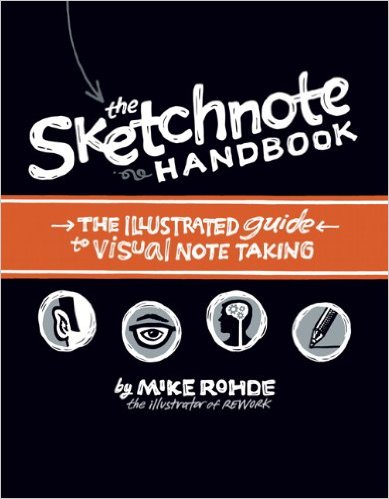
The other breakthrough came when I saw The Sketchnote Handbook by Mike Rohde in my local library:

The most important thing I picked up from the book is to use pen instead of pencil. This forces me to always make progress instead of erasing and re-drawing and second-guessing myself. It also makes me more forgiving of my mistakes, and come up with creative ways to fix them.

In the toolbox about bullet lists, I made two bullets with stars, because a single bullet doesn't make a list. And then I realized that I have nothing to more to say. What to do? The second star was already drawn. With ink.

I ended up writing "There is no second point" next to the second star. And you know what? It now emphasizes the fact that it doesn't take much to make sketchnotes.

A lot of serendipity came from using a pen and being forced to make things work.

Find your style

I really enjoyed the The Sketchnote Handbook because it includes examples from many sketchnoters. I pick and choose techniques that works for me:

  • Some sketchnotes are very free form, popping images left and right seemingly randomly. That terrifies me. But many examples use a grid style. I came up with my own layout algorithm: top to bottom, and if an item took too little horizontal space, put something next to it. This is very similar to traditional note taking, just using a bit more horizontal space. I can do that.
  • Some sketchnotes fill the whole page, and the pressure to do so paralyzes me. But many examples have whitespace between the items, and that is totally okay.
  • The book recommended using a vertical layout for panels, drawing the face of one panelist on each column. There is no way I can draw portraits. So I skipped that part. But it also showed a few simple ways to draw people. Now Starfish Man is a regular cast member in my sketchnotes.

Share

This is the most potent motivator: Twitter. You know how some people take a screenshot of a block of text to get around the 140 character limit? That looks stupid. But I can totally post a sketchnote to stuff more content into a tweet. And it looks awesome. So awesome that I get lots and lots of retweets, which gave me the confidence to do more sketchnotes, which gets more retweets.


Gotta love that positive feedback loop!