Thursday, November 13, 2014

Copenhagen

After speaking at Droidcon London, I flew to Copenhagen to speak at Øredev.

Even though Øredev is in Sweden, you get there by flying to Denmark. This is because Malmö, its host city, is only 20 minutes by train from the Copenhagen airport. Since I have never been to Denmark before, I spent the weekend sightseeing in Copenhagen. My friend Cate is also speaking at Øredev, and we toured Copenhagen together.

I was sustained by conference high during my two-and-a-half-day stay in London. But come Saturday I crashed hard, and was pretty much unconscious the whole flight from London to Copenhagen. To combat my jet lag, we walked almost 3km the to see the Little Mermaid.

We also went to Kastellet, the star fortress next to Little Mermaid. But it was so foggy and gloomy that I didn't have any good photos.

The sky cleared up a bit the next day so I took more photos.

We walked to the Glyptotek museum to see Degas' ballerina. I really like the indoor courtyard.

Breakfast was really late since I slept in, so when we were done with the museum it was tea time already. And so we went to Conditori La Glace for tea!

Afterwards we went to Tivoli Gardens, the second oldest amusement park in the world.

Normally I don't go to amusement parks when I travel, but I am very glad that we went to Tivoli Gardens. There is the ride which goes really high up, offering a great view of Copenhagen. I don't think you can get that view anywhere else!


The ride from below. I was not crazy enough to take a photo on it.

Without a proper lunch, both of us were craving real food. Cate suggested sushi, to which I nodded enthusiastically. We went on to have this absolutely amazing meal at Sticks'n'Sushi.

I am still thinking about that meal! Too bad they don't have Sticks'n'Sushi in the US.

Monday, November 10, 2014

Droidcon London 2014

I had a great time speaking at Droidcon London 2012, and I am very happy to go back this year.

First thing first: gotta love these super cute icons!

Barcamp

Day 1 is barcamp. Everyone got a chance to get on stage and pitch their session.

There were quite a variety of topics. I was entertained by a hilarious app clinic, killed the refresh button with SyncAdapter, and discovered that you can address any 3mx3m grid in the world with 3 words.

Practical Best Practices

We rounded up the day with a satire talk by Chet Haase: Practicing Practical Best Practices for Software Development Practitioners.

Lollipop

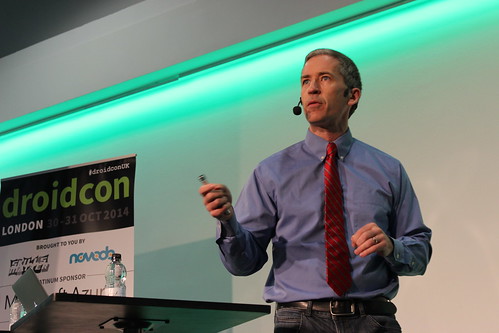
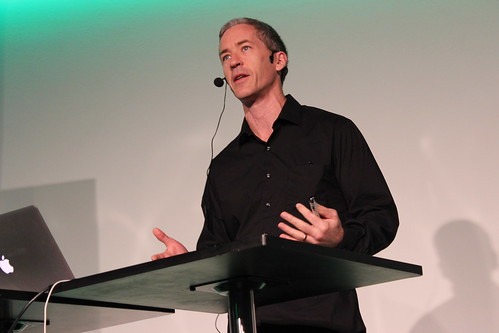
Day 2 is presentations, starting with keynote from Chet the Googler, not to be confused with Chet the consultant from the day before, who wore a tie.

Chet the consultant (Credit: Skills Matter)
Chet the Googler (Credit: Skills Matter)

Chet told us about What's New in Android, followed by Chris and Nick with more Lollipop tips:

Design

Next I learnt about design from Juhani Lehtimaeki and Taylor Ling.

Graphics trilogy

In the afternoon, there were three talks on graphics, including mine.

Mark opened the trilogy with Graphical Magic. And by magic I meant he was setting stuff on fire!

With that great opening, Mark went on to show us how to do image manipulation programmatically.

Next in the trilogy was my talk, Fun with Android Shaders and Filters, where I showed more image processing techniques.


Slides: http://chiuki.github.io/android-shaders-filters

And finally, Sebastiano Poggi covered the Skia pipeline in Framing the Canvas.

Best part: The people

Droidcon London is one of my favorite conferences. The talks are great, but more importantly I get to hang out with really awesome people.


Thank you everyone for the wonderful conference!

Monday, October 20, 2014

First look at AnimatedVectorDrawable

Android Lollipop introduced a lot of sweet new classes. The one that caught my eye is AnimatedVectorDrawable, and I decided to check it out right away.

Example from Documentation

The documentation included an example, so I created the files as instructed: res/drawable/vectordrawable.xml, res/drawable/avd.xml, res/anim/rotation.xml and res/anim/path_morph.xml

Now what? There are many ways to use a Drawable. How about in a TextView?

<TextView
  xmlns:android="http://schemas.android.com/apk/res/android"
  android:layout_width="wrap_content"
  android:layout_height="wrap_content"
  android:text="@string/example_from_documentation"
  android:drawableBottom="@drawable/avd"/>

No animation yet. Let's start it.

for (Drawable drawable : textView.getCompoundDrawables()) {
  if (drawable instanceof Animatable) {
    ((Animatable) drawable).start();
  }
}

And voilà! Animation. But what is it? Let's step it through.

res/drawable/vectordrawable.xml

<vector
  xmlns:android="http://schemas.android.com/apk/res/android"
  android:height="64dp"
  android:width="64dp"
  android:viewportHeight="600"
  android:viewportWidth="600" >
  <group
    android:name="rotationGroup"
    android:pivotX="300.0"
    android:pivotY="300.0"
    android:rotation="45.0" >
    <path
      android:name="v"
      android:fillColor="#000000"
      android:pathData="M300,70 l 0,-70 70,70 0,0 -70,70z" />
  </group>
</vector>

This is the VectorDrawable. The path defines a triangle, and the group rotates it by 45 degrees.

res/drawable/avd.xml

<animated-vector
  xmlns:android="http://schemas.android.com/apk/res/android"
  android:drawable="@drawable/vectordrawable" >
  <target
    android:name="rotationGroup"
    android:animation="@anim/rotation" />
  <target
    android:name="v"
    android:animation="@anim/path_morph" />
</animated-vector>

Next we have avd.xml, which rotates the group and morphs the path.

res/anim/rotation.xml

<objectAnimator
  xmlns:android="http://schemas.android.com/apk/res/android"
  android:duration="6000"
  android:propertyName="rotation"
  android:valueFrom="0"
  android:valueTo="360" />

res/anim/path_morph.xml

<set
  xmlns:android="http://schemas.android.com/apk/res/android">
  <objectAnimator
    android:duration="3000"
    android:propertyName="pathData"
    android:valueFrom="M300,70 l 0,-70 70,70 0,0   -70,70z"
      android:valueTo="M300,70 l 0,-70 70,0  0,140 -70,0 z"
    android:valueType="pathType"/>
</set>

The rotation starts from 0 degrees. But since our drawable is initially rotated at 45 degrees, there is a sudden jump when the animation starts. It takes 6000ms to reach 360 degrees. Meanwhile, the path morphs from a triangle to a rectangle in 3000ms, half the time. So, at 180 degrees, the morph is complete.

Phew, that was not obvious at all. To understand what was happening, I split the rotation and the path morph to observe them separately.

Clock

After trying the example, I wanted to make my own, to see if I can come up with some simple animations that makes sense. I like the idea of animating different parts of the VectorDrawable, and made a clock.

The hours arm rotates from 9 o'clock to 5 o'clock while the minutes arm goes around from 0 to 60 minutes. The duration of rotations are set differently to give them different speeds.

Smiling face

Next I played with path morph. What is a path morph that makes sense? Let's make a sad face into a happy face!

Points to note

  1. The <vector> tag must have android:height and android:width to define the intrinsic width and height of the VectorDrawable. Your app will crash if you skip them.
  2. If your VectorDrawable has a smaller android:height or android:width than when you use them say in an ImageView, your graphic will look pixelated.
  3. To morph from one path to another, the paths must be compatible. They need to have the exact same length of commands, and exact same length of parameters for each command.

I am very excited about VectorDrawable and AnimatedVectorDrawable. Scalable graphics FTW!

Source code: https://github.com/chiuki/animated-vector-drawable

Friday, October 10, 2014

Pan-CJK font on Ubuntu

Ubuntu supports Chinese out of the box, kind of:

See those rectangles? Some characters are not rendered, but enough are, so I left it like that for months. But it was starting to annoying me, and I finally looked into it. Turned out some fonts are missing. I installed ttf-arphic-ukai, which got rid of the rectangles, but I didn't like the way it looked. ttf-arphic-uming was not satisfactory either. As I agonized over which of the two to pick, I remembered that Google and Adobe announced a Pan-CJK font a while ago. Here is how to install it on Ubuntu:

  1. Download the zip file from the Adboe github page.
  2. Unzip it to a temporary directory.
  3. Copy the OTF directory to /usr/share/fonts/. I created a subdirectory opentype/source-han-sans, but you can put them anywhere you want.

Restart your browser, and voilà, all the characters are rendered in a beautiful font:

Wednesday, October 8, 2014

Localizing the globe

You have probably seen this at the beginning of a movie:

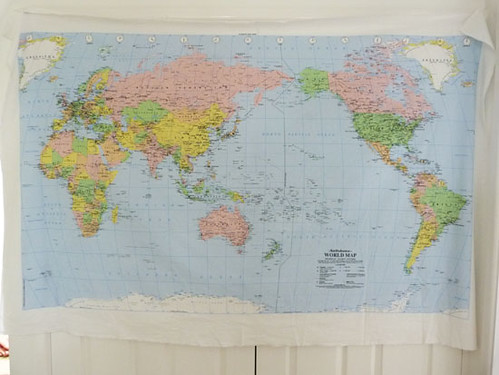
I am always caught by surprise when the globe stops spinning, expecting to go further. Watching it closely, I realized why: it stops at the Americas. I grew up in Hong Kong, where world maps look like this:

What's special about it? The center of the map is the Pacific Ocean. In my mind, that is the focal point of the globe, so I felt unsatisfied when the Universal globe stops spinning at the Americas.

I found it ironic that the globe, being the obvious icon for a global society, is actually usually localized. And today I found a delightful case of a localized globe - the notification icon in the top right corner of Facebook:

I never paid much attention to it, but my friend Corey is visiting Sweden, and noticed that her icon changed from showing the Americas:

To Europe, Africa and Asia:

Very subtle, but very cool!

Sunday, August 3, 2014

GDG Boulder

I moved from California to Colorado this May, and want to get more involved with the local tech community. As an Android developer, especially as a Google Developers Expert, my natural choice is to help organize GDG Boulder.

Last Thursday we met for Lightning talks and I/O Show and Tell.

We had two speakers for lightning talks:


Ian Douglas on SendGrid's partnership with Google.


Robert Kluin on Go.

After that, the floor was open for I/O Show and Tell. People who went to Google I/O brought their Android Wear watches, Cardboard, Android TV and devices with Android L preview. Everybody got to play with the new toys and share their thoughts. It was great fun.


Immersed in Cardboard

Next, on August 21, our meetup is going to feature mind-controlled robots. Join us!

Tuesday, June 24, 2014

GetSET App Inventor Workshop

I have always wanted to try App Inventor, so when my friend asked me if I'd be interested to teach a workshop on mobile programming for GetSET in Santa Clara, I immediately said yes. But thing got a bit more complicated when I decided to move to Colorado. I wasn't sure I would be able to run the workshop until I gave a talk at Mills College and met Renee there, who volunteered to be my TA.

Preparation

There were a few things we need to do to prepare for the workshop:

  1. Come up with a lesson plan
  2. Make sure we have Android devices
  3. Set up the workstations in the computer lab

Renee helped with all three. She was in Prof Ellen Spertus' class, who wrote a book on App Inventor. Ellen said that a good workshop format is demo-walkthough-explore, meaning that I would first code up an app in front of the whole class, explaning basic concepts. Then I would talk through a simple tutorial, with everyone following on their own computer. Finally it would be free time. The students could build whatever app they want. I thought this was a great format, getting more and more hands-on.

For the devices, Ellen lent me a few Nexus 7 tablets for the workshop, and Renee took care of the pick up and drop off. Finally, the compuer lab setup, which was the most complicated part. The workstations in the computer lab did not have wifi, so we had to use USB connection. GetSET was hosted by Santa Clara University, and only admins can install software. They asked me to send the list of software to be installed, but we needed to verify that the workstation could connect to the tablet after installation, so this could not be done remotely. Fortunaely Renee was able to drive down to Santa Clara for the initial installation. At that point we did not have access to the Mills tablets yet, so I borrowed a Nexus 7 from a friend to leave with the lab technician to repeat the installation across all the lab computers.

Workshop

Yesterday was the big day. The workshop was 9am to noon, and Renee and I showed up at 8am to get everything ready, with two more volunteers. To our horror, the tablets were not connecting to the workstations. We had a few theories: the driver was installed under admin mode, but we ran the workshop in user mode. The Nexus 7 for the initial set up was first generation, but the Mills tablets were newer. In any case, we could not use the workstations. We ended up using laptops from the volunteers, which meant 4 computers, 10 students. Not too bad a ratio.

With all that taken care of, we were ready to make apps! I demoed a raffle app that say the name of the winner:

Then we walked through Hello Purr together. There was much laughter as the tablets meowed.

Finally it was free time. The girls really enjoyed making apps, and did not want to leave when I announced a bathroom break in the middle! Different teams made different apps. Some added doodling capabilities to the cat, some made whack-a-mole, some made a pirate ship go get gold, some made text-to-speech for Spanish. It was great fun.

Next steps

I really enjoyed running this workshop. App Inventor is a great way to introduce basic programming concepts because it is lightweight to set up, and running apps on the kids' phones made it much more personal. I am not sure how to graduate them from App Inventor to Android, though. App Inventor only has a subset of the Android capabilities, and right now there is no way to convert an App Inventor project to Java+XML for Android, so they would have to rewrite the whole app if they wanted to step beyond the App Inventor functionalities.

Have you taught App Inventor before? What do you do when your students want to step up the game?