Friday, January 16, 2015

Android Hack Night

I hosted an Android Hack Night at GDG Boulder last night.

Android Hack Night is for everyone who's interested in Android programming. If you...

  • Have no Android experience
    Install Android Studio on your laptop and we'll walk through Hello World together.
  • Just got started but not sure what to do next
    Follow the Udacity course and bring your questions.
  • Tinker with Android as your side project
    Bring your project, share what's working and where the pain points are.
  • Live and breathe Android
    Come help others, or, if you are brave, there will be a coding challenge where you write an app on the spot and present your solution.

We will all be coding, so don't forget your laptops, chargers, Android devices and USB cables!

We had a pretty good turnout, almost 30 people. I asked everybody to introduce themselves and tell us about their Android experience. Since there were quite a few beginners, I gathered everyone who'd like to step through Hello World in a corner, and the rest of the people huddled in groups to work on their apps.


Couldn't get the projector to work so I held up my laptop.

Initially I was going to have every group share what they did at the end, but I lost track of time while helping people with their emulators and devices, so it was a bit of a bummer. But overall it was really fun, and I definitely want to do it again!

Thursday, January 1, 2015

Speak more

Happy New Year! It is customary to take stock of the year past, and as I looked back the most striking thing is how far I have come as a public speaker.

In 2012 I made my new year resolution to be a public speaker. Publishing my speaking topics on the blog post was a great way to bootstrap. It has been 3 years, and I have since given more than 30 talks in 9 countries.

Public speaking has been quite the career booster for me, but it was not easy to get started. To share what I have learned, I created the Technically Speaking newsletter with my friend Cate Huston:

http://tinyletter.com/techspeak

The newsletter goes out about once a week, with call for proposals, speaking tips, and inspirational videos. We went with a newsletter because it is great for time-sensitive information like call for proposals (rather than sitting on a webpage and looking stale), and the recurring nature gives you the gentle nudge to get your acts together to put in a proposal.

If you would like to speak more in 2015, please consider subscribing. And if you made a list of your speaking topics, please send us a link. Conference organizers are always looking for speakers, and the more visible your list, the more chance it will get matched to a relevant conference!

Tuesday, December 23, 2014

RecyclerView: Autofit grid

After I made a RecyclerView grid with a header, I realized that I want to make it auto fit as well. I want to define the size of each item and let the system compute the spanCount automatically.

To determine the number of spans, I need two things: the width of the RecyclerView, and the width of each item.

AutofitRecyclerView

We extend RecyclerView to get access to its width. As for the width of each item, when GridView has android:numColumns="auto_fit", it uses android:columnWidth to compute the number of columns. Let's reuse that attribute.

private void init(Context context, AttributeSet attrs) {
  if (attrs != null) {
    int[] attrsArray = {
        android.R.attr.columnWidth
    };
    TypedArray array = context.obtainStyledAttributes(
      attrs, attrsArray);
    columnWidth = array.getDimensionPixelSize(0, -1);
    array.recycle();
  }

  manager = new GridLayoutManager(getContext(), 1);
  setLayoutManager(manager);
}

In the constructor, we read the value of android:columnWidth and save it in a member variable. Later in onMeasure will will use it to determine the span count.

Even though we will be setting the span count in onMeasure, the app will crash if we wait until then to define a GridLayoutManager, so we create one here as well, with a span count of 1.

In onMeasure, we ask the super class to perform the measurement, then take the value from getMeasuredWidth to compute the span count.

protected void onMeasure(int widthSpec, int heightSpec) {
  super.onMeasure(widthSpec, heightSpec);
  if (columnWidth > 0) {
    int spanCount = Math.max(1, getMeasuredWidth() / columnWidth);
    manager.setSpanCount(spanCount);
  }
}

Notice the Math.max call? This makes sure that we will have at least a span count of 1, even if the column width is defined to be larger than the width of the RecyclerView.

With that, the span count changes with the width of the RecyclerView.

One thing to note: we are using the column width the compute the span count, and once that is given to the RecyclerView it will turn around and compute the width of each item. So for instance if your RecyclerView is 320dp wide and you use a column width of 72dp, a span count of 4 (320dp / 72dp = 4.4444) will be given to the RecyclerView, which will make your items 320dp / 4 = 80dp wide, not 72dp. Make sure your item layout takes that into account.

Source: https://github.com/chiuki/android-recyclerview

Why bother?

Since GridView already supports auto fit, why bother reimplementing it using RecyclerView? RecyclerView has a lot of other functionalities like built-in animations for inserting and removing items, reordering etc, so you may want to use that instead of GridView.

Sunday, December 21, 2014

RecyclerView: Grid with header

GridView shares a lot of features with ListView, with one noticeable difference: no headers or footers. Now they are unified under RecyclerView, and I want to see how I can add a header to a grid.

GridLayoutManager

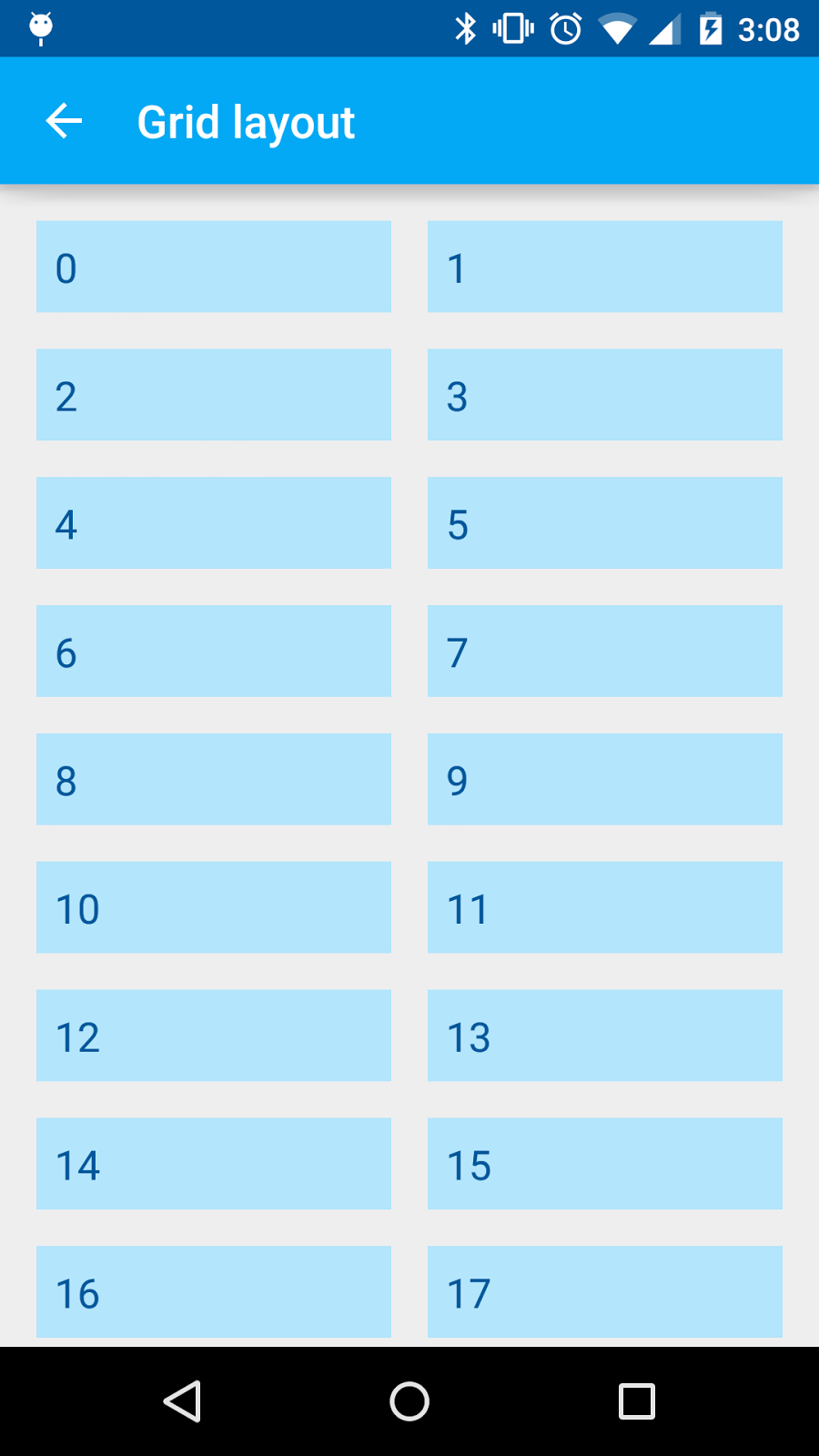
I created a RecylcerView using a GridLayoutManager with a spanCount of 2.

RecyclerView recyclerView = (RecyclerView) findViewById(
    R.id.recycler_view);
recyclerView.addItemDecoration(new MarginDecoration(this));
recyclerView.setHasFixedSize(true);
recyclerView.setLayoutManager(new GridLayoutManager(this, 2));
recyclerView.setAdapter(new NumberedAdapter(30));

NumberedAdapter shows the position of the item as string, and toasts when clicked.

Variable span size

In the basic setup I have a spanCount of 2, each item with a span size of 1. A header will need a span size of 2 instead. Before I try to add a header, I want to see how I can change the span size. Turns out to be fairly easy.

GridLayoutManager manager = new GridLayoutManager(this, 3);
manager.setSpanSizeLookup(new GridLayoutManager.SpanSizeLookup() {
  @Override
  public int getSpanSize(int position) {
    return (3 - position % 3);
  }
});
recyclerView.setLayoutManager(manager);

setSpanSizeLookup lets you change the span size according to the position. This formula gives me span sizes 3, 2, 1, 3, 2, 1...

Header

Now let's add a header! We will need an adapter that providers two view types, one the header and one for the items. Take a look at HeaderNumberedAdapter, which takes a View as the header in the constructor and stash it away in a member variable.

public boolean isHeader(int position) {
  return position == 0;
}

@Override
public TextViewHolder onCreateViewHolder(
    ViewGroup parent, int viewType) {
  if (viewType == ITEM_VIEW_TYPE_HEADER) {
    return new TextViewHolder(header);
  }
  View view = LayoutInflater.from(parent.getContext())
    .inflate(R.layout.item, parent, false);
  return new TextViewHolder(view);
}

@Override
public void onBindViewHolder(
    final TextViewHolder holder, final int position) {
  if (isHeader(position)) {
    return;
  }

  // Subtract 1 for header
  final String label = labels.get(position - 1);

  holder.textView.setText(label);
  holder.textView.setOnClickListener(new View.OnClickListener() {
    @Override
    public void onClick(View v) {
      Toast.makeText(holder.textView.getContext(), 
          label, Toast.LENGTH_SHORT).show();
    }
  });
}

@Override
public int getItemViewType(int position) {
  return isHeader(position) ? 
    ITEM_VIEW_TYPE_HEADER : ITEM_VIEW_TYPE_ITEM;
}

@Override
public int getItemCount() {
  return labels.size() + 1;
}

When the RecyclerView creates a view, if we are at the header position we wrap the stashed header with the view holder. On bind does not need to do anything for the header since the logic is done in the activity. However, we need to subtract the position by 1 when we bind the remaining items.

Back to the activity. We need to initialize the HeaderNumberedAdapter with a header, and also override the setSpanSizeLookup to have the header span all the columns.

final GridLayoutManager manager = new GridLayoutManager(this, 2);
recyclerView.setLayoutManager(manager);

View header = LayoutInflater.from(this).inflate(
    R.layout.header, recyclerView, false);
header.setOnClickListener(new View.OnClickListener() {
  @Override
  public void onClick(View v) {
    Toast.makeText(v.getContext(), R.string.grid_layout_header, 
        Toast.LENGTH_SHORT).show();
  }
});
final HeaderNumberedAdapter adapter 
    = new HeaderNumberedAdapter(header, 30);
recyclerView.setAdapter(adapter);

manager.setSpanSizeLookup(new GridLayoutManager.SpanSizeLookup() {
  @Override
  public int getSpanSize(int position) {
    return adapter.isHeader(position) ? manager.getSpanCount() : 1;
  }
});

We inflate the header, define its click behavior, and use it to construct the adapter. Then, in setSpanSizeLookup, we return the span count as the span size if we are at the header position.

Summary

To create a grid with header using RecyclerView:

  1. Define an adapter with two view types, one for the header and one of the items.
  2. Inflate a header and pass it to the adapter.
  3. Override setSpanSizeLookup in GridLayoutManager to return the span count as the span size for the header.

Source: https://github.com/chiuki/android-recyclerview

P.S.: I got a comment on my Google+ post that you can also copy HeaderGridView.java out of AOSP if you don't need other RecyclerView functionalities such as animation, reordering and staggering.

Tuesday, November 25, 2014

AnDevCon SF 2014

I can't believe this is my fifth AnDevCon already! This time I am living in Colorado, so Burlingame is no longer local. But as luck would have it the GDE Summit is one the same week at the Google headquarters, and I got to combine the two trips. The flip side is that they overlap quite a bit, and I ended up only attending the last two days of AnDevCon, plus the fireside chat Wednesday evening.

Fireside chats

There were two fireside chats / panel discussions at this AnDevCon, both very informative and entertaining:

Sessions

I didn't go to many sessions, partly because I was only there for two days, but partly because each session is 75 minutes long. After subtracting time for keynotes and sponsor sessions, there was really only time for 3 to 4 sessions a day. Since I was giving two sessions myself, I ended up only going to 5 sessions.

My talks

My two talks were back-to-back on Friday morning. First I had Advanced Android TextView at 8:30am.

I gave the 40-minute talk at Øredev, but the audience reaction was quite different. Here I was among Android developers, and people jumped in with interesting questions pretty much right away. I loved that! I was having a great good discussion off stage afterwards as well, but had to cut it short since I needed to run to another room to give another talk.

My next talk, Fun with Android Shaders and Filters, was in the Regency ballroom. Quite a different experience to present from a stage.

The crowd was a bit larger, not sure if it was 10am vs 8:30am, or people were more interested in graphics. In any case, both talks went very well!

RxJava

RxJava is quite hot among in Android world, and I am very curious about it. I attended a talk at Droidcon London but didn't quite get what it is, so I tried again with a session at AnDevCon. Alas:

This time I got a bit further: I understood that RxJava builds on the concept of asynchronous sequences, and as a result you can apply many operations on them. That's why there were all these marble diagrams for map, filter etc. I think I should give up on trying to learn it by listening to a talk though, and instead get my hands dirty with tutorials:

Tips on building SDKs

AnDevCon ended on a great session from Ty Smith sharing his experience building the Fabric SDK, filled with tips and insights.

Check out the video for the full talk.

New speakers

I am very happy to see new speakers at AnDevCon, sharing their knowledge with everyone. Do you work on Android? If so, submit a talk!

Tuesday, November 18, 2014

Android Stacked Fractions

I read about a small new feature on TextView in Android Lollipop:

I never heard of CSS font-feature-settings, but a quick internet search led me to a sandbox, where I can play with OpenType font features such as kerning and ligature. Not particularly exciting, but then I scrolled down the list and saw fractions. I experimented with different settings and came up with this:

Stacked fractions! Let's put that in a TextView.

First, I need a font that supports afrc. I chose Nutso2, an Apache 2 licensed font.

I first tried to set font settings on the whole TextView:

Typeface typeface = Typeface.createFromAsset(
    getAssets(), "Nutso2.otf");
textView.setTypeface(typeface);
textView.setText("1/2 2/5");
textView.setFontFeatureSettings("afrc");

Looks good. But then I want to display one and a half. If I set text as "1 1/2" there is a space, and if I use "11/2" it shows eleven over two. What to do?

I went back to the Nutso project for their demo page:

1<span class="afrc">1/2</span>

HTML with span, eh? Why yes, I can do that in Android! We'll need a TagHandler with a custom Span.

1<afrc>1/2</afrc>

The TagHandler is called twice: at the start of the span, again at the end. We mark the beginning of the tag with a Spannable.SPAN_MARK_MARK so we can retrieve it at the end of the span. With that we have the start and end positions of our stacked fraction, and we can apply our FractionSpan to activate the afrc font feature settings.

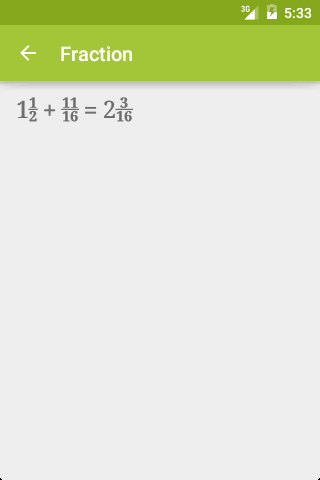
Now we have mixed fractions, no space. Yay!

Source: https://github.com/chiuki/advanced-textview (FractionActivity)

To hear about this and other cool TextView tricks, come to my Advanced Android TextView talk at AnDevCon this Friday!

Thursday, November 13, 2014

Øredev: a superbly run conference

Technically Speaking

When Cate and I was touring Copenhagen, we talked about how we got into public speaking. One thing led to another, and we decided to publish a newsletter together. We had a little bit of time on Monday before Øredev, so we put together our first issue in the hotel lobby!

Sauna, bus tour, glögg and the city hall

After we prepared our newsletter we met the organizers and other speakers to head to Kallbadhuset, a Swedish bath house perched on top of the Baltic Sea. We had an appetizer (herring!), went into the sauna (hot!), dipped in the Baltic Sea (cold!), and then had dinner (more fish!). My first night in Sweden, and it was definitely super Swedish.

And that was just the start of the speaker activities. Tuesday they organized three things for us, starting with a bus tour of the city of Malmö. I signed up for the 3pm tour so I had the morning free, and grabbed Cate to see the astronomical clock in Lund.

Later in the evening, we had a pre-dinner event with glögg (glüewine) and pepparkaka (ginger bread cookies), and an acapella performance!

Then we moved to the City Hall, where we were addressed by the mayor of Malmö, and dined in this beautiful hall.

The conference

The conference started on Wednesday, with three days, eight tracks, more than 150 sessions total. With so many simultaneous talks, I had to make a choice every hour, and I came up with a strategy. I prioritize talks with:

  1. Great speakers
  2. Props
  3. Technology that I would not look into otherwise

Great speakers

James Mickens definitely falls under the "great speakers" category. His talk was hilarious!

Christian Heilmann explained why we are not using HTML5, with great visuals.

Props

In the "props" category I have The Internet of Things Magic Show and Oculus Rift.

Great insights

Lots of great insights on how we interact with computers:

Celebrity

To top it off, Øredev invited Nile Rodgers for a candid chat!

A superbly run conference

Øredev is the best run conference I have ever been to. The attention to detail is amazing.

A round badge! With a lens in it!

The podium seen through the Øredev lens.

Sign posts pointing to the rooms. Much easier to see than signs on walls, which they also had.

A smoke screen!

Lightweight feedback screen at the door of each room.

Other impressive things:

  • There were at least 20 minutes between the sessions, so even if one session ran overtime it wouldn't eat up time from the next session. Also gave you time to hang out in the hallway and talk to people, grab a coffee etc.
  • Speaking of coffee, there were plenty of food: breakfast, lunch, snacks, and dinner!
  • And they treat their speakers really well. All travel costs are covered, and they pampered us with so many speaker activities.
  • Finally, all sessions are recorded, and uploaded right away. They were so efficient, I don't even know how they did that.

Here are my two talks:

Tack så mycket, Øredev!